Now you need not log onto your computer to watch your favorite videos. YouTube has signed up with leading cell phone companies that will enable users to download Youtube videos right on their mobiles.
YouTube Videos On Your Phone
In this Gen Nex age, it’s all about walking with technology in your pocket!! So, be it mobile phones or palmtops, you are just a click away from tuning into the world outside. Talking about mobile phones, gone are the days when they used to be just audio devices for exchanging messages. Today, a mobile phone has become a miniature form of a computer. Right from calling up people to sending SMS, storing music to clicking snaps, the horizon of mobile phones has surpassed boundaries. To obtain this, all that you require is a hi-tech phone, an internet connection and an internet-savvy heart. Now, who would have thought about such a thing to exist, say about two decades back? 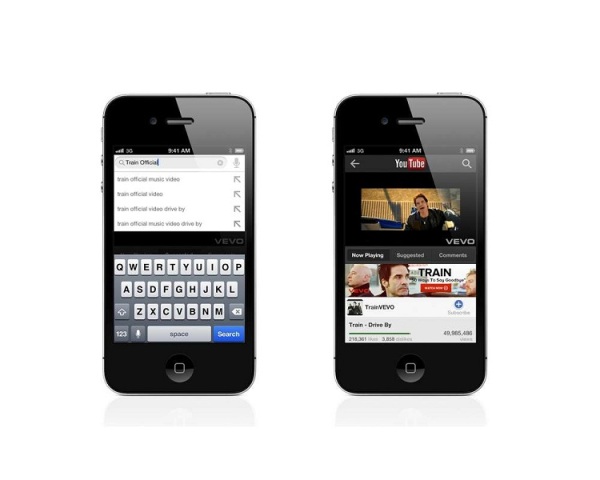
Such is that fast growing nature of technology that you can even watch videos of your favorite songs or even scenes from a classic movie or the marriage ceremony of a distant cousin that you did not attend in your mobile phones, without much fuss, thanks to YouTube - a web portal. The website allows you to share personal videos with your family and friends all around the globe. Those of you who have web-enabled phones with MMS facility can now easily get your favorite videos on your cell phones. As of now, YouTube has signed up with Nokia as well as Verizon to provide the services. In case you don’t know how to go about downloading your favorite videos, here is a step-by-step procedure on how to do it.
How To Download YouTube Videos On Your Mobile Phone
- YouTube is a wed portal designed to make quick and easy work to download Youtube videos and convert them. After downloading, it would convert the FLV files to the file type that you need.
- Next, install YoutubeGet in your computer. It is a fast process and requires no prior technical knowledge. Once the installation is done, you can double click YoutubeGet Icon on the desktop to run it. You will see the Getting Started Wizard, which is simple and easy.
- Now, browse through the website and search for your favorite videos. Once you have found you favorite videos, drag their URL on to the YouTubeGet Drag Zone on the right top of screen. You can also copy the videos URL.
- A Task-Add window would jump out. You would also see that the URL (that you selected) has been auto-filled in the Task URL Box.
- Now, you need to select a file type for video converting. AVI would convert the file for Microsoft Windows Media File Type, WMV would change it to Zune/PocketPC File Type, MOV will convert it to QuickTime File Type, MP4 would alter it to iPOd/PSP/MP4 Player File Type and 3GP to Mobile Phone Video File Type.
- Since you want to download the video on your phone, click the download bar for the last option. It would take a couple of minutes to finish downloading.
- Now, all you need to do is just copy the file from its location into your mobile phone.
How to Cite





See also
- Cameras | Computers | Gaming Devices | HTC Mobiles | How To Do | Internet | Ipods & MP3 Players | LG | Laptops | Mobile Phones
More in 'Gadgets & Gizmos'
More from iloveindia.com
- Home Remedies | Ayurveda | Vastu | Yoga | Feng Shui | Tattoos | Fitness | Garden | Nutrition | Parenting | Bikes | Cars | Baby Care | Indian Weddings | Festivals | Party ideas | Horoscope 2015 | Pets | Finance | Figures of Speech | Hotels in India : Delhi | Hyderabad | Chennai | Mumbai | Kolkata | Bangalore | Ahmedabad | Jaipur
- Contact Us Careers Disclaimer Privacy Policy Advertise With Us Lifestyle Sitemap Copyright iloveindia.com. All Rights Reserved.